


Cookie Policy - Local03
This cookie policy (the "Cookie Policy -Local03") provides comprehensive and transparent information about the use of cookies and other tracking technologies when you visit and interact with our Local03 website available at: https://www.local03.com/services/tokomni/(the "Website"), operated by OMNITelecom Ltd. ("OmniTelecom", "we" or "us") as data controller. https://www.local03.com/services/tokomni/
https://local03.com/services/tokomni/
https://www.omnitelecom.co.il/services/tokomni/
We and our partners use Cookies and other tracking technologies, such as pixels, tags, SDK and beacons to collectand process data about your use of our Local03 website (such as page views), your IP address, browser type, operating system, the type of device you are using, device identifier. This data is used to improve the Local03 website, your user’s experience and enhance data security measures of the Local03 website. For more details on cookies and options for changing settings, seebelow.
If you have questions or concerns regarding this Cookie Policy - Local03 please contact us at [email protected]
1. WHAT IS A COOKIE?
Cookies (here in after, "Cookies") are small text files that store or retrieve information on your browser or device (computer, tablet, mobile phone, etc.) by websites and applications that you visit.
They are widely used by website and application owners, including us, for technical reasons, in order to help our Local03 website operates and to increase their efficiency and security. We refer to these as “essential” or “strictly necessary” Cookies.
Other Cookies help us better understand the needs and preferences of our users, in order to improve your browsing experience, save your preferences or adapt the services offered to youon the Local03 website.
We use both first-party cookies and third-party cookies – which are cookies from a domain different than the domain of the Local03 website you are visiting.
2. COOKIES LIST
The full list of cookies operated onour Platform is provided below.
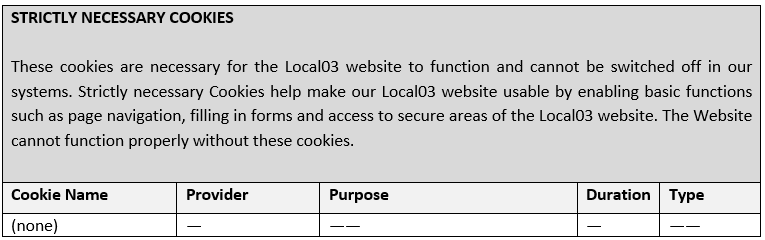
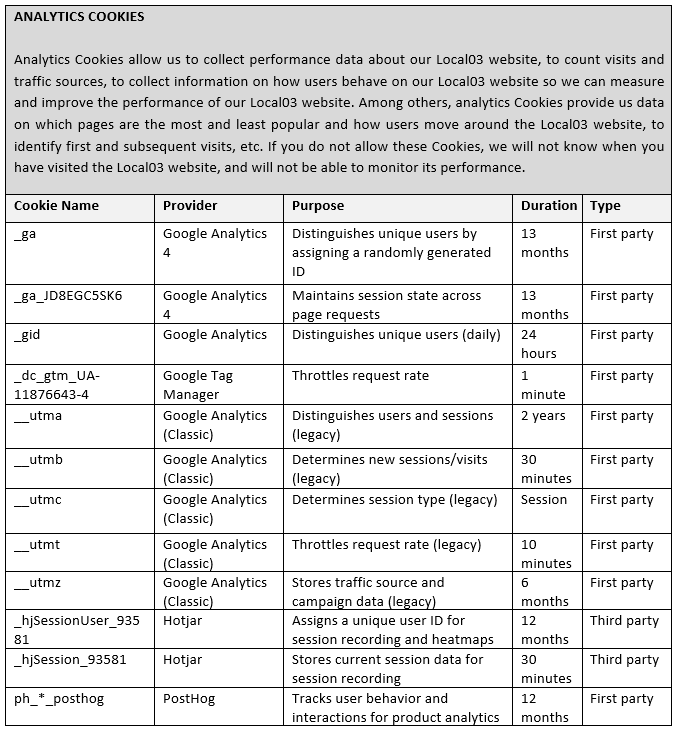
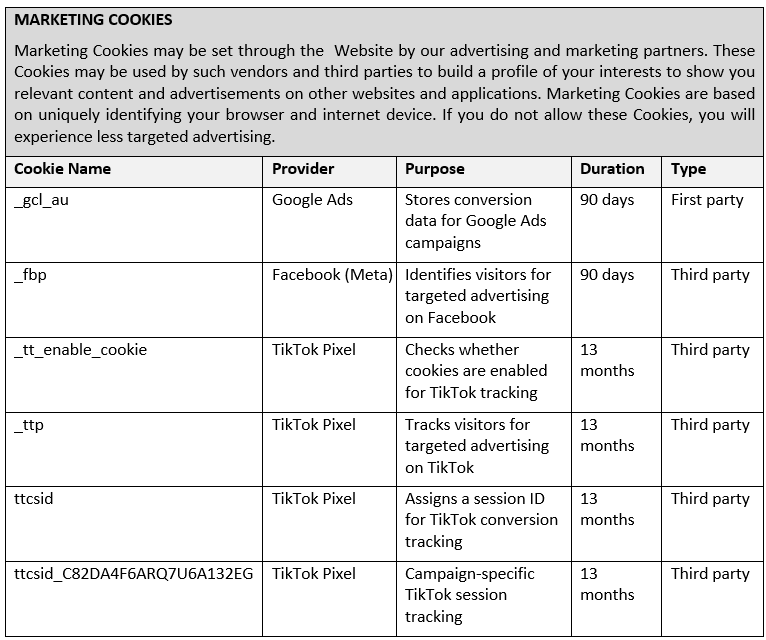
3. HOW CAN I SEE WHICH COOKIES ARE SAVED IN MY DEVICE ANDHOW DO I CHANGE MY COOKIES SETTINGS?
Some web browsers allow control of most cookies through thebrowser settings.
If you wish to know which Cookies have been saved on your deviceor if you can delete Cookies, you can use a parameter of your browser. To disable Cookies and limit the collection and use of information through Cookies, you can set your browser to refuse Cookies or indicate when a Cookieis being sent. The opt-out Cookie is browser and device specific and will only last until Cookies are cleared from your browser or device. You will find more information on how to do it via the following links: Firefox; Chrome; Safari; Internet Explorer; Firefox (mobile) ; Chrome (mobile); Safari (mobile); Microsoft Edge.
If you use another browser, you can check if the procedure for your browser is mentioned in this explanatory website.
You can find out more about cookies and how to see what cookiesare on your computer, visit aboutcookies.org or allaboutcookies.org.
